Feedback in most companies works like this: once a year HR sends out a form, half the people ignore it, the other half answer on the deadline, and the results get consolidated by hand into a spreadsheet only HR ever opens. A year later there's nothing to compare against — the wording changed, the file moved, the person who owned it left.
360 reviews in DTPulse are the same exercise with the assembly, reminders, access rules and history built in. And, more importantly, with an answer to "is this better than last time".
How a review is put together
HR builds a review out of four things: who is being rated, who rates them, which competencies, and by when. Both sides can be picked by department rather than one name at a time — a department expands to everyone inside it, including nested teams. Edits save themselves; there is no Save button on the setup page.
Competencies come from your company's library. Adding one to a review copies its name, description and scale into that review, so the library stays freely editable — rewrite or delete an entry and neither running nor long-closed reviews are affected.
The questionnaire
Competencies and questions live in one ordered list. You arrange the items exactly as a respondent will meet them: the communication block first, then two follow-up questions about it, then the next competency. Questions can be free text, single choice, multiple choice, or a scale, and choice questions can offer an "Other" option with a write-in field.
A question can be linked to a competency, in which case its answers blend into that competency's score at equal weight with the direct rating. And you can ask different groups different questions: a manager gets one prompt, a peer gets another, and both still contribute to the same number.
The Preview tab shows the questionnaire exactly as a participant sees it, with a self/other toggle for audience-scoped questions. Nothing typed there is stored — it's a draft you can walk through as often as you like.
What the respondent does
Every rater scores each competency on its own scale — 1 to 5 by default, and a competency can be given any range between 0 and 10. "Cannot evaluate" is an honest opt-out: it doesn't drag the average down, it's excluded from it.
Comment rules are set per competency: not asked, required only on the extreme scores, or required on every score. That single setting is what separates a useful report from a column of numbers — a "1" with no explanation helps nobody.
Answers save as they're typed, so a long questionnaire can be finished in three sittings. With self-assessment enabled, the person being rated answers the same questions about themselves.
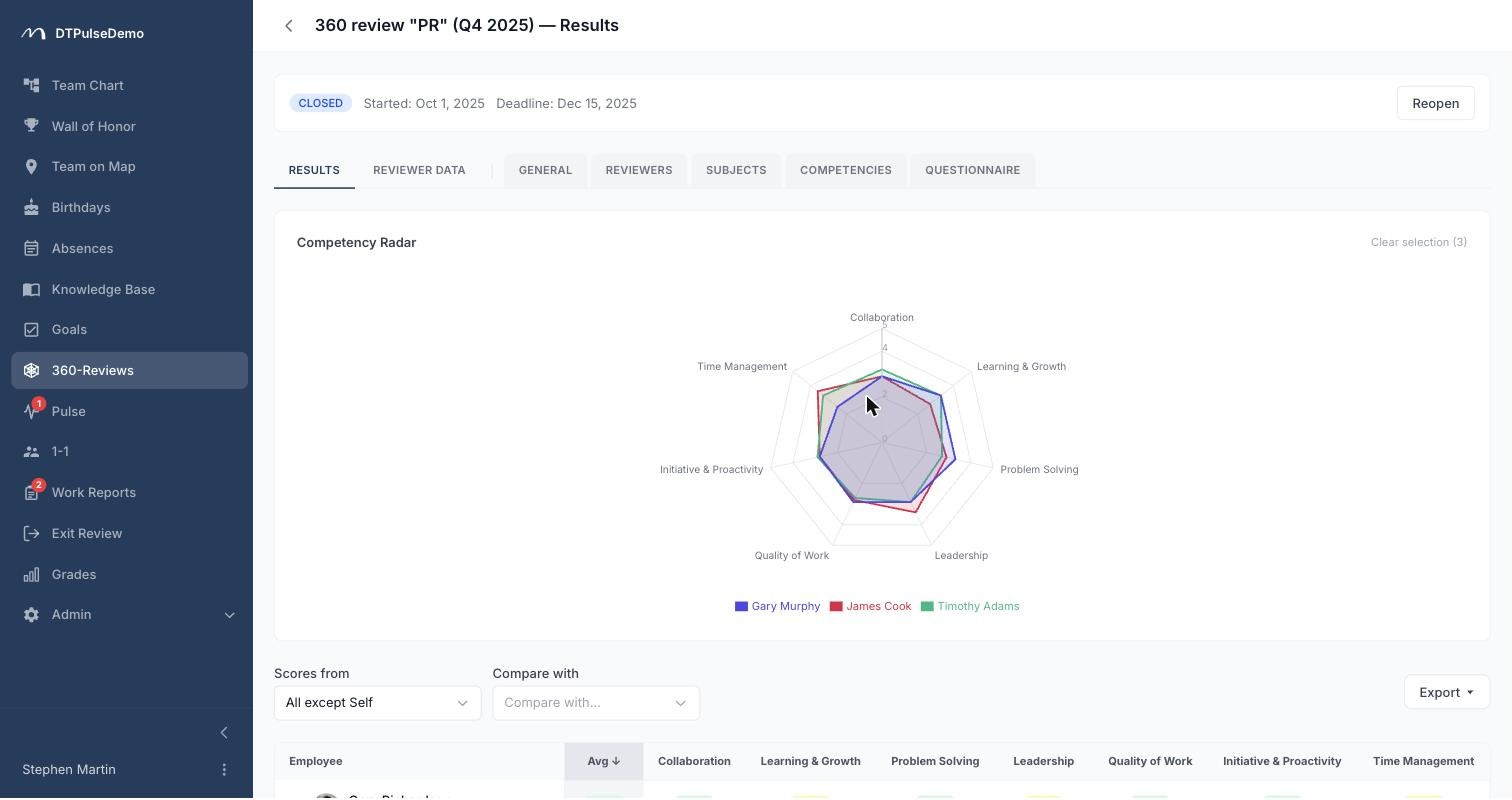
Results
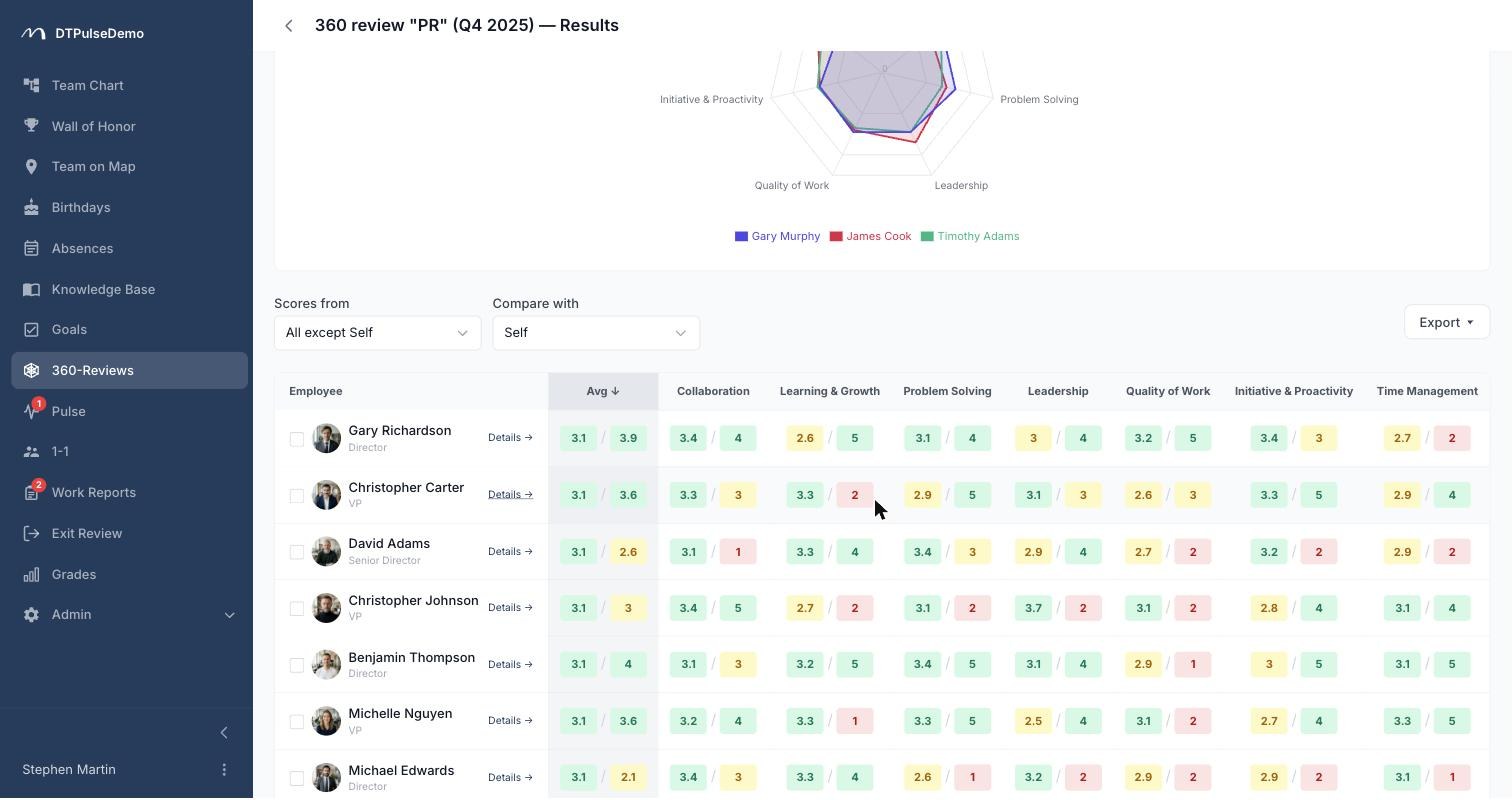
The results page opens with a radar chart, a sortable table, and a score distribution per competency. Next to it sits the self-versus-others comparison, usually the single most useful view in the whole exercise.
Raters are classified automatically into four groups — self, managers, reports and peers. You can look at any one slice and compare two against each other: what managers said versus what reports said, on the same competencies.
A Trends block draws one line per competency across every closed review the person has been rated in. Access is re-evaluated for each past review against its own visibility settings, not the current one, so history never leaks through a setting somebody relaxed later.
Individual results export to PDF or XLSX exactly as they appear on screen; the aggregated view exports to CSV with every relationship slice as its own column block.
Who sees what
Each review carries three separate settings — what HR sees, what managers see, and what the rated person sees. Each is one of three values: full, including rater names; anonymous, meaning scores and comments without names; or hidden. HR sees results from the moment the review starts; managers and the rated person only after it closes.
HR is the only role with blanket access. Everyone else, admins included, sees reviews through participation: as a rater, as a subject, or as the manager of someone rated.
Whose time this saves
HR assembles a review for a 200-person company in an evening rather than a week. Reminders go out with one button and count the people who never started, not the ones who happen to have a row in a table.
Managers get real material for a development conversation — not an impression, but a competency-level view with the gap between self-assessment and the team's read of it.
Employees find out how different groups of colleagues actually see them, and what has moved since last time.
How it connects to the rest of the portal
Subjects and raters come from the org chart. The manager classification uses the same reporting logic that routes absence approvals. Competencies are shared with grades, so review results land on the same framework people are promoted against — one vocabulary rather than two.
Getting started
Take three or four competencies from the library, arrange the questionnaire, walk it through Preview, and run it on a single department first. The second review is a copy of the first.
360 reviews are available on every plan. The plan-based constraint is how many run at once: by default one on the free tier, three on TEAM, ten on BUSINESS. Closing a review frees the slot.