In most companies, time off lives in three places at once: a chat with the manager, a spreadsheet on the HR drive, and the head of whoever was supposed to cover the work. The three rarely agree. And when two of four people in a team book the same week, that usually surfaces on the Monday.
Absences in DTPulse are one calendar, one request, and one approval route. Everything downstream of somebody being away then updates itself: their card in the org chart, their Slack status, the daily digest the team reads.
A calendar that answers "who's in"
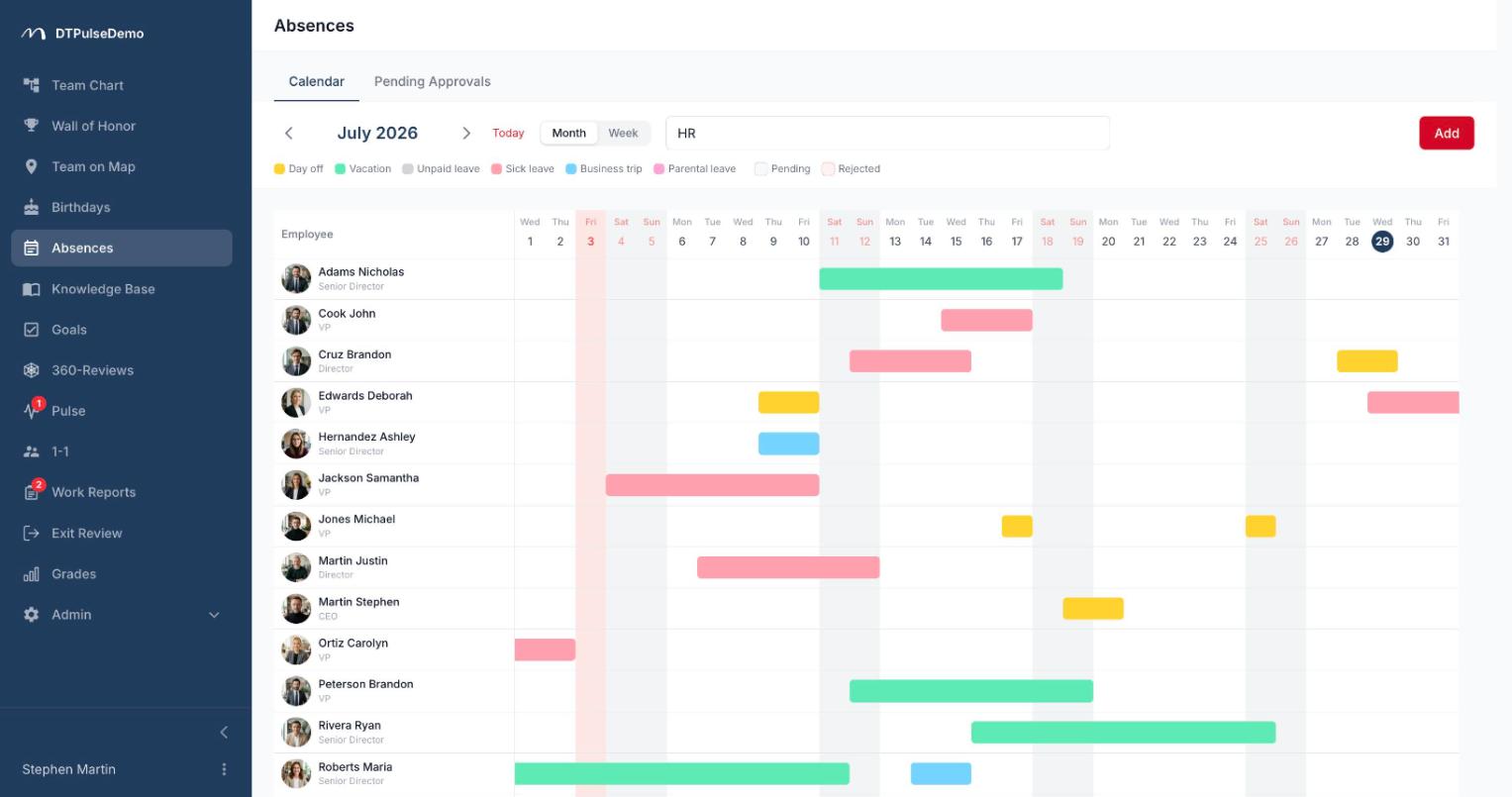
The main screen is a day grid — days across the top, people down the side, coloured bars for time off. The department filter works on the tree, so picking a department includes every team nested under it, and it opens on your own department by default.
Public holidays sit underneath the grid: production calendars for 82 countries ship with the product, and you can add your own company closure days or rename entries to match local practice. Multi-day holidays render as a single range rather than a row of separate dates.
Requests that haven't been approved yet appear as their own layer. That matters more than it sounds: a manager deciding on a new request can already see who else on the team was planning to be away those days.
Requesting and approving
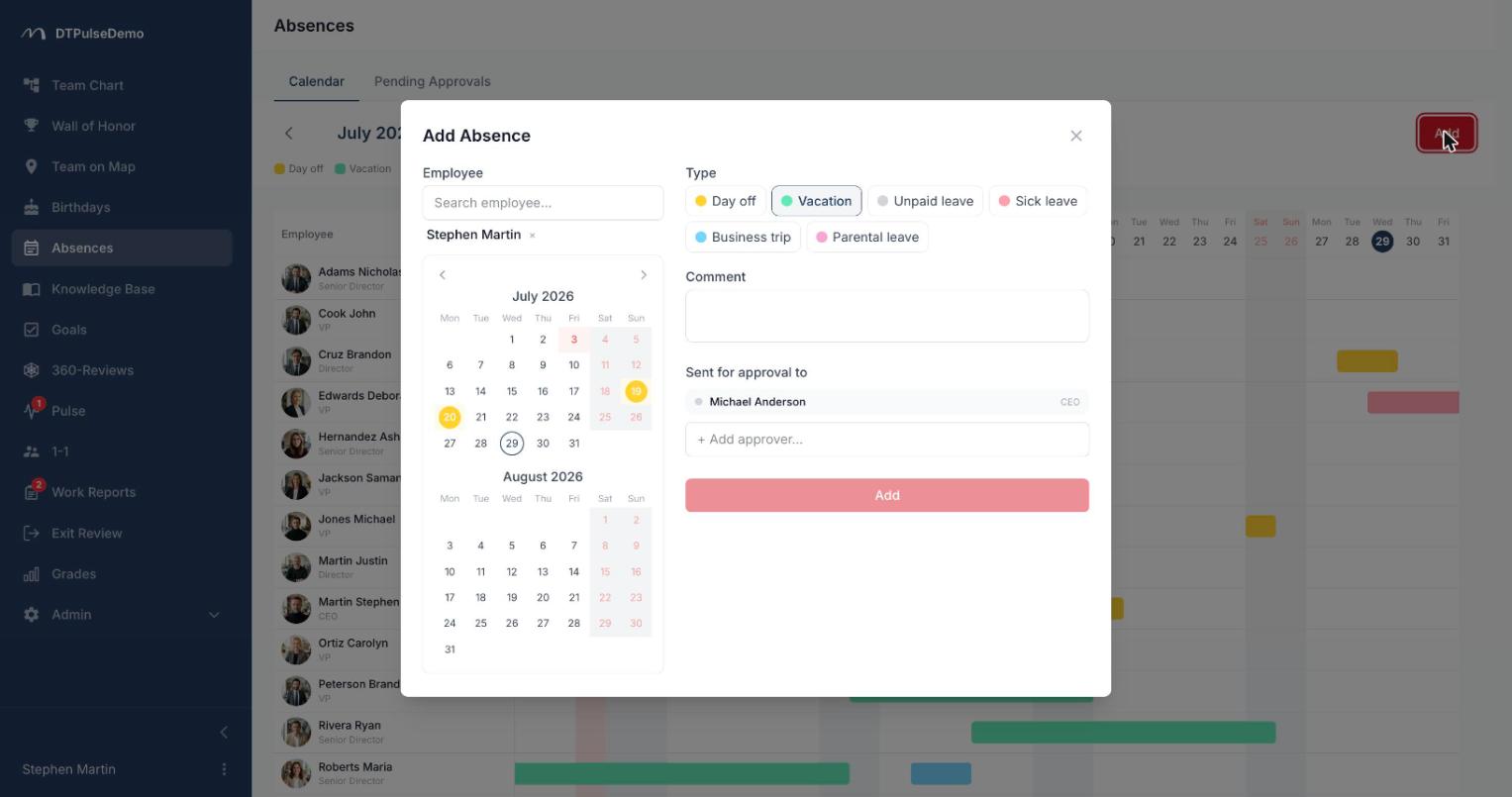
An employee opens the form, picks dates and a type, and can leave a comment. The form immediately shows the absences that already exist in that range and warns about overlaps — before submission, not after.
The system then assembles the approver list on its own. It doesn't read a single "manager" field; it combines four channels: the direct manager, department heads walking up the tree, manually assigned additional managers, and departments the approval has been delegated to. People who have left the company drop out automatically. If nobody resolves, the request goes to the company's admins rather than sitting in limbo.
Every approver gets an email and, with Slack connected, an interactive message with Approve and Reject buttons — a decision without opening the portal. The rule is deliberately blunt: any rejection rejects the whole request, and the absence is created only when every approver has said yes. The requester sees partial approvals as they land.
Once approved, the absence appears in the calendar and the person's Slack status is set automatically, with the return date in it. Companies that don't want an approval step can switch it off in settings — the absence is then created straight away.
Quotas, not "how many days do I have left"
Any absence type can carry a quota: a period (month, quarter or year), a number of days, an accrual rule — the full allowance up front, or accrued proportionally as the period passes — and carry-over into the next period, with an optional cap on how much rolls over.
The balance is computed transparently: accrued, plus carry-over, plus manual adjustments, minus days used. Every adjustment requires a reason, so "where did those three days come from" is a question with an answer. Employees see their own balances above the calendar, and the request form warns when they ask for more days than they have. HR can push such a request through anyway — but that's a deliberate act, recorded as an override, not a silent overdraft.
Days are counted as calendar days minus any non-working public holidays that fall inside the range.
Absence types that match how you work
Eight built-in types (holiday, day off, sick leave, business trip, unpaid leave and others) can be switched on or off per company. On top of that, add your own: a name and a colour from 33 presets or any custom hex. Each type carries a "counts as rest" flag, which decides what feeds the rest balance on an employee's profile and the work-life-balance analytics.
Whose time this saves
Employees file a request instead of negotiating in chat, and get a straight answer on how many days remain.
Managers get a button in Slack instead of an inbox, and the team calendar in front of them at the moment of the decision.
HR stops maintaining a leave spreadsheet as a separate artefact. Balances, carry-over and adjustments are computed in the product rather than in formulas nobody dares to touch.
The team can see a month ahead who won't be there. That's the only way to plan load without a meeting about it.
How it connects to the rest of the portal
An absence isn't an isolated record. It shows next to the person in the org chart, on their card on the office map, and in the daily absence digest in Slack or email. Approval routes are built from the same reporting structure you already maintain — there's no separate "approval tree" to keep in sync.
For teams with strict data-residency requirements, DTPulse can be self-hosted: the portal runs on your own infrastructure, and sick-leave records never leave it.
Getting started
Enable the absence types you actually use, load the public-holiday calendar for your country, and — if you track balances — configure quotas per type. After that, the first request finds its own approvers.
Absences are available on every plan, including the free tier for up to 10 people.