In a company of twenty, the org chart lives in the founder's head. At fifty, it lives in a spreadsheet last updated two quarters ago. At a hundred and fifty it doesn't exist at all: there are three contradictory versions in old slide decks, and a new hire in week two still can't work out who to ask about access rights.
The org chart in DTPulse isn't a picture somebody redraws once a year. It's a live view of the same records that drive absences, approvals, 360 reviews and birthday announcements. Change a reporting line and it changes everywhere at once.
What you see
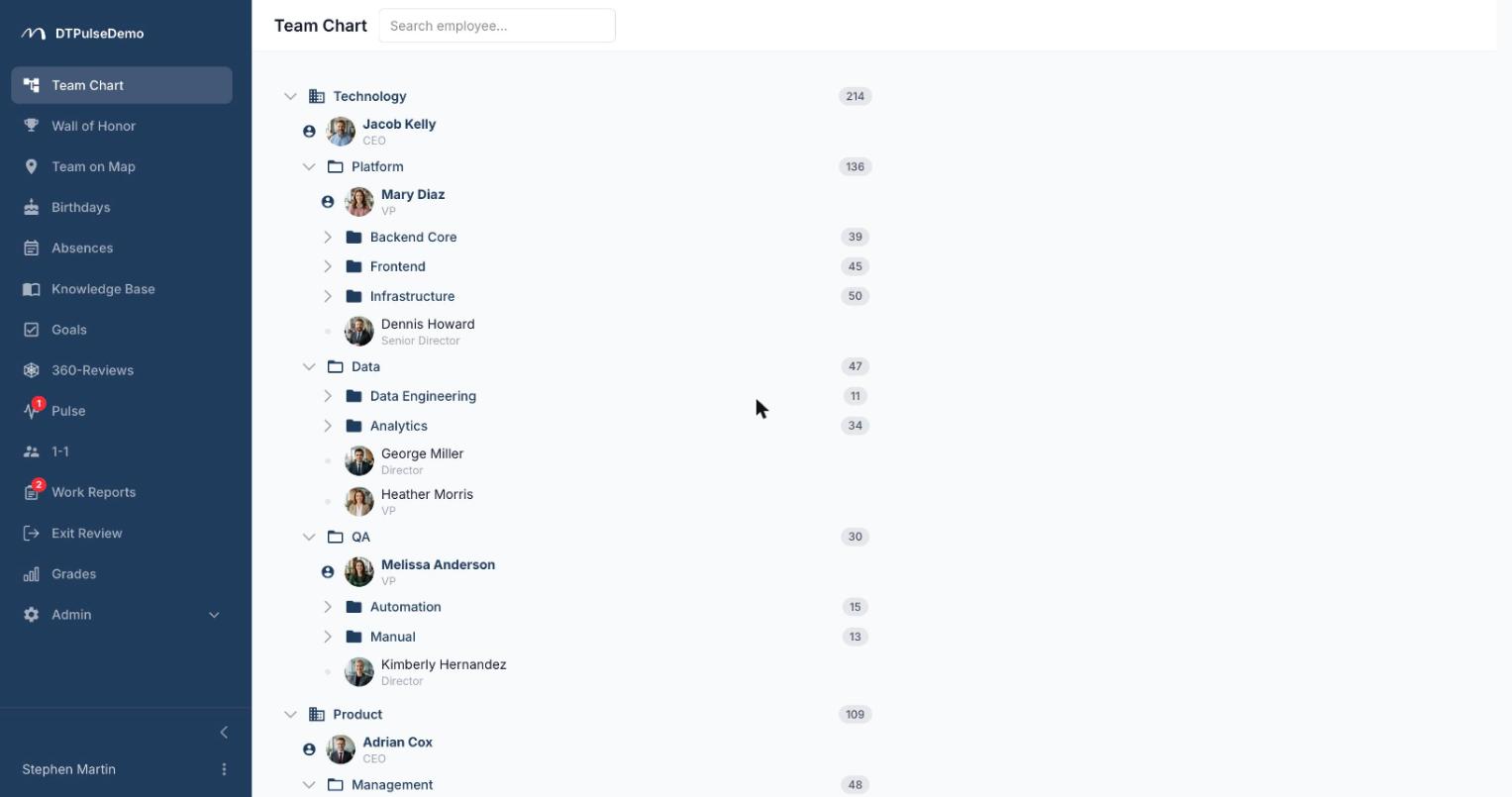
The tree expands from the company down through departments and sub-departments, with no depth limit. Each department shows its head (or heads), its people with photos and job titles, and a headcount that includes every nested team. Collapse a branch and the count stays: you can see that Engineering is 48 people without expanding it.
Next to each person, the tree surfaces what's happening today: who's on holiday or sick leave, whose birthday it is, who's hitting a work anniversary. That answers the most common question in any team chat — "is Ivan around?" — before anyone asks it.
Search that expands the tree
Search covers first name, last name, job title and department name. Instead of returning a flat list stripped of context, it expands the tree down to every match and highlights it. You don't just learn that three product managers exist — you see where they sit and who they report to.
Profiles in one click
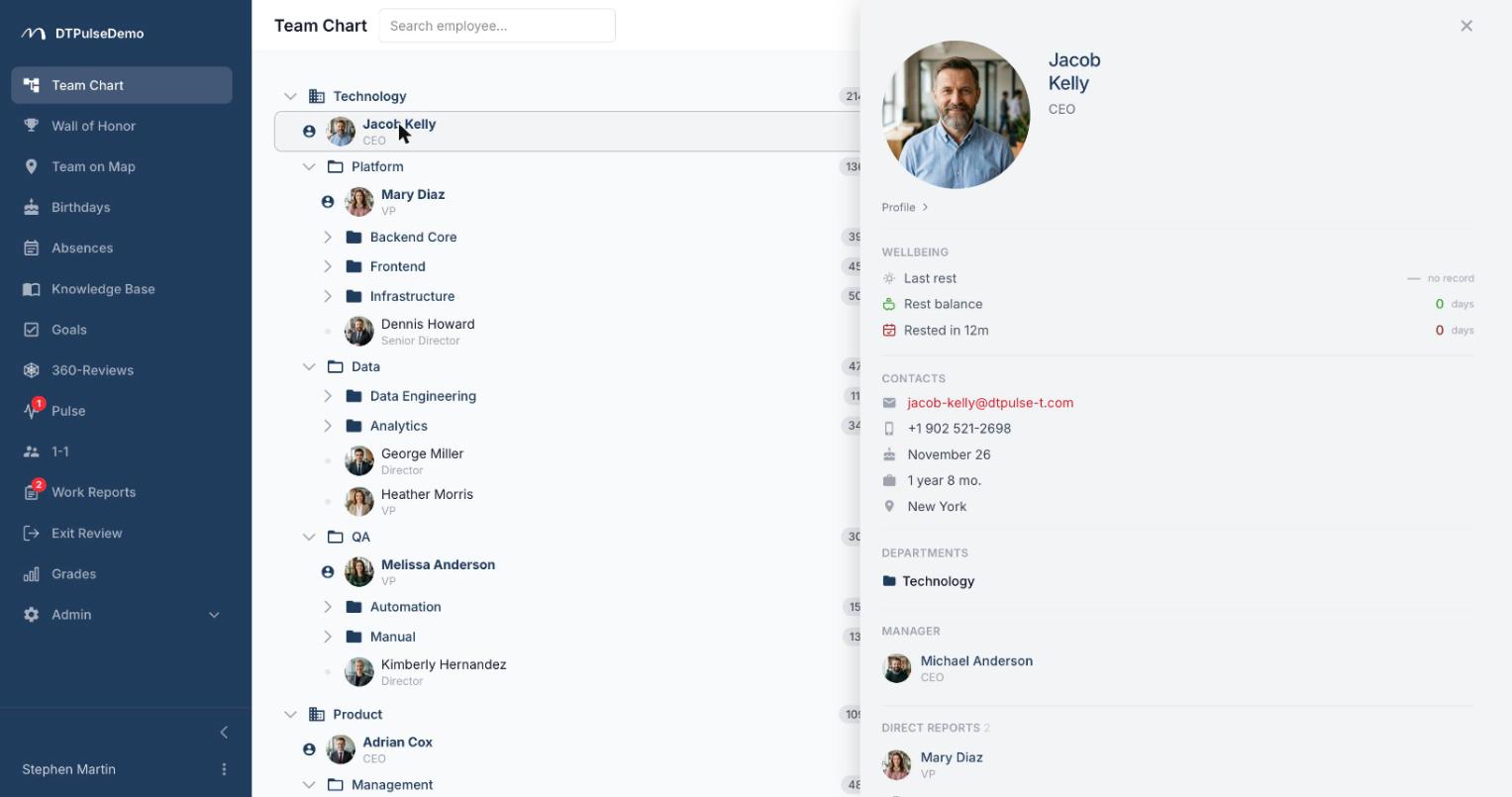
Clicking a person opens a profile panel over the tree, without navigating away and losing your place. Inside: photo, job title, department, contact details, manager, direct reports, birthday, current absence status, awards, and any custom fields you've defined for your company.
Direct reports aren't read from a single "manager" field. The system combines four channels: direct reporting lines, manually assigned additional managers, department leadership, and leadership inherited from a parent department. That means a matrix structure — where someone has both a functional and a project manager — is described honestly rather than squeezed into one field.
Access rules
Everyone can see the org chart; that's the point of it. What differs is depth — a profile card reveals different amounts of detail to different roles, and sections like grades and review results stay restricted: managers see their own people, HR and admins see the whole company.
Whose time this saves
New hires get a first week without asking "who owns this?" — they open the tree and find out themselves.
Managers can see who in their area is available today and who's away, without messaging HR.
HR stops maintaining the structure as a separate artefact. It updates as a side effect of normal work: hire someone, move them between departments, make them a lead — the tree is already current.
Leadership gets a real view of span of control: who has twenty direct reports and who has one. That's a hard conversation to open from a spreadsheet and an obvious one in front of a tree.
Where the data comes from
Add people by hand or import a CSV — the importer reports errors row by row instead of rejecting the whole file over one typo. Departments are created in the admin area, and the order of people inside a department is configurable. With SAML SSO connected, accounts are created automatically on first sign-in.
A connected Slack workspace doesn't create employees: it matches the records you already have to Slack accounts by email, which is what powers approval buttons and status sync — not a way to populate the structure.
After that the structure maintains itself: any personnel change is entered once on the employee's card and immediately shows up in the tree, on the office map, in absence approval routing, and in review participant lists.
Getting started
Create your departments, assign heads, import your people — for a company of a hundred that's one evening of work. After that the tree keeps itself alive.
The org chart is available on every plan, including the free tier for up to 10 people.