Exit interviews are the practice every company of two hundred agrees is valuable and almost nobody runs consistently. HR does them when the calendar allows, the answers end up in someone's private notes, and a year later "why do people leave us?" gets answered from memory and from the last dramatic case.
Exit review solves a narrow slice of that, but solves it reliably: it asks everyone, at the same moment, in the same words, and files the answers into a series you can read over a year.
The questionnaire shows up by itself
HR configures one questionnaire for the company and switches it on. After that, nothing is done by hand.
When a last working day is set on an employee's record, the system freezes a snapshot of the current questions for that person. On the day itself, the section appears in their sidebar with a red badge; they fill it in, submit, and the badge clears. The next day their portal access ends automatically, along with everything else.
The window is exactly that one day, resolved in the company's time zone. The form doesn't open earlier or later, no invitation email goes out, and submitted answers can't be edited afterwards. So set the last working day in advance rather than retroactively, or the window closes before it opens.
The snapshot matters more than it looks. Rewrite a question whenever you like: already-issued questionnaires keep the version the person actually saw, while analytics still merges old and new answers into one series, because they're linked by question identity rather than by text. Even a question deleted from the template keeps its history.
What you can ask
The builder is the same one used for pulse surveys: NPS, a scale with a configurable range and per-value labels, single choice, multiple choice, ranking, free text. Any question can be marked required, and a questionnaire holds up to fifty.
While it has no questions, the questionnaire can't be enabled — the toggle refuses and says why. That's a guard against the empty form that produces the appearance of a process and collects nothing.
Who reads the answers
Answers are not anonymous, and the person filling the form is told so in it: their answers go to HR.
Only HR and company admins can read submissions and the aggregate analytics. That's enforced on the server, not hidden in a menu. The departing employee's manager has no access — including the manager the answers might be about.
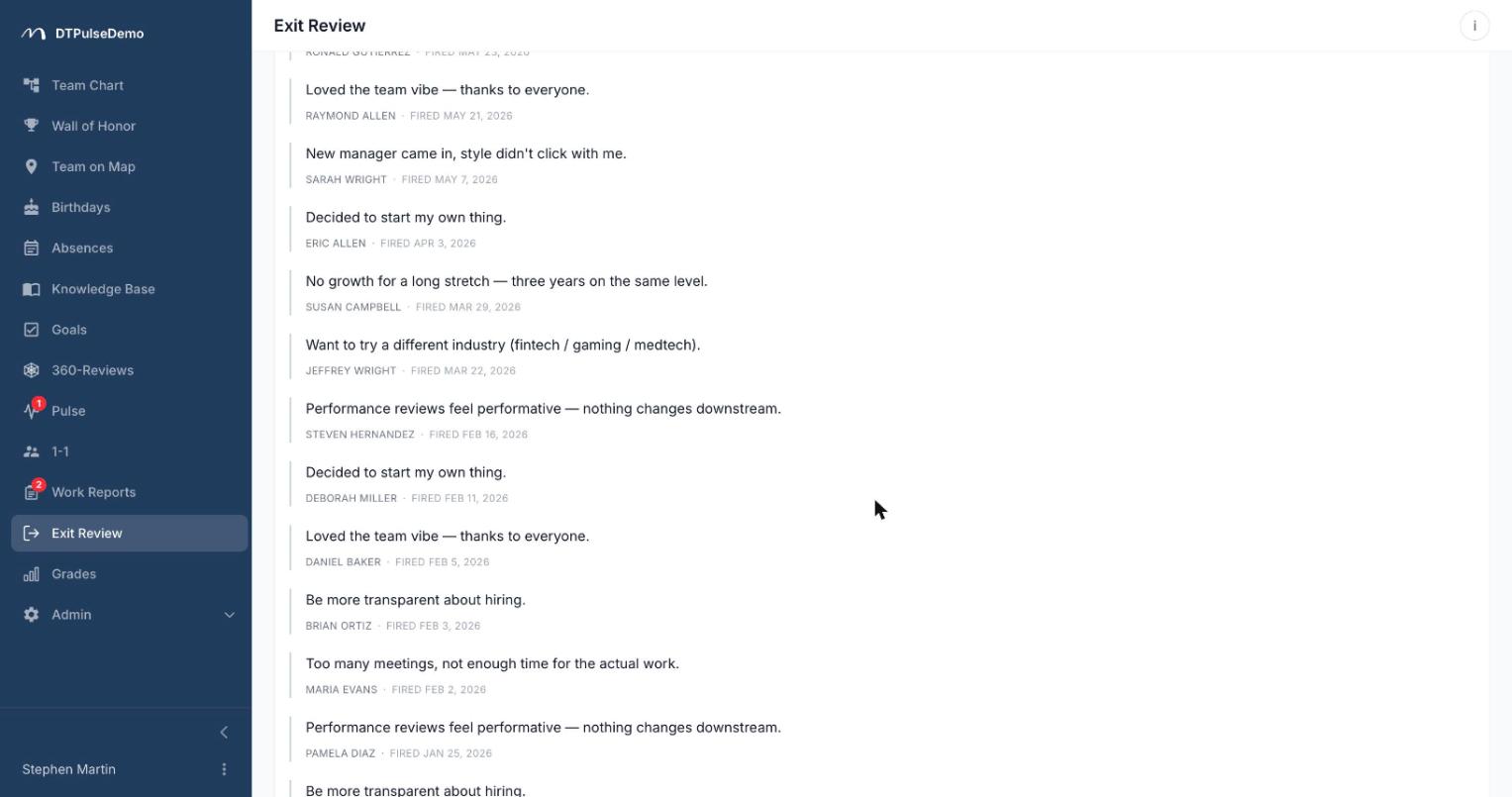
The lack of anonymity is deliberate. One person fills the form at one moment in time, so any promise of de-identification would be theatre — the date alone identifies them. Free-text answers carry the author's name and departure date even inside the aggregate view, for the same reason: the point of an exit review is being able to go back with a follow-up question.
If you need genuinely anonymous feedback, the portal has pulse surveys: there anonymity is a property of how responses are stored, plus k-anonymity on aggregates, rather than a promise in the copy.
One departure is a story, twenty are data
The submissions list shows every departure in the period, including people who filled in nothing — those rows read "Not submitted". The completion rate is itself worth watching.
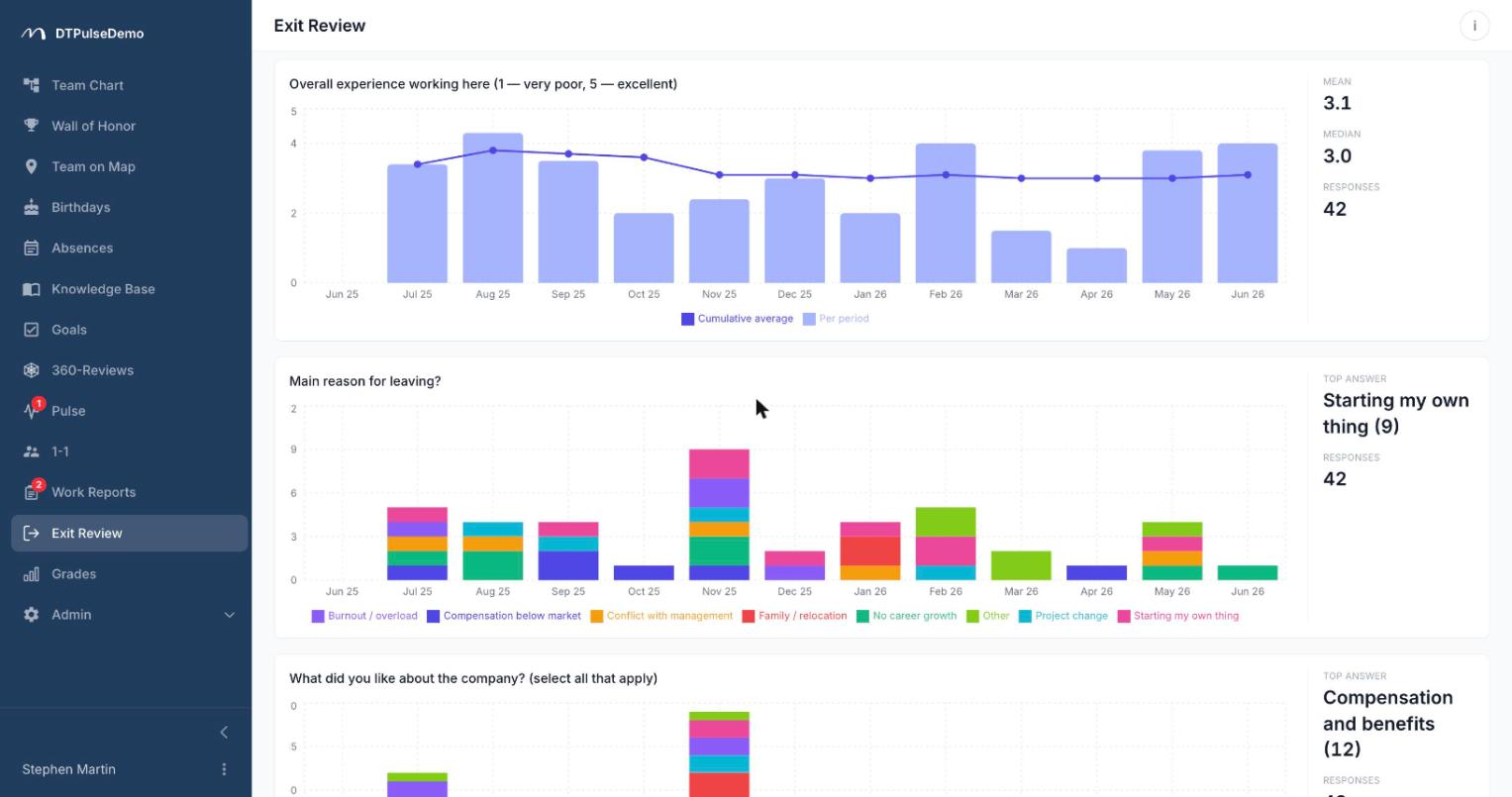
The analytics tab works over a date range you choose. At the top is a departures chart by period, counting every exit rather than only completed forms, so averages are read against the real scale. Below it, a card per question: numeric questions get per-period mean bars plus a cumulative-average line that damps the noise of small samples; choice questions get bars stacked by option; ranking questions get options ordered by mean position; text questions get an expandable list of full quotes. Each card carries a summary for the whole range — mean, median, response count. Bucket size picks itself: weekly for ranges up to two months, monthly for longer ones.
Whose time this saves
HR stops having to schedule a conversation with every leaver just to get a baseline set of answers. The conversation stays where it genuinely adds something.
Leadership gets a year-long series instead of "it feels like people leave over pay" — including whether a score moved, and when.
The departing employee gets five minutes on their last day instead of a meeting that's awkward to accept, and knows who will read it.
The company keeps what otherwise disappears entirely: why the person hired two years ago left, when they were the last one who remembered how the billing integration works.
How it connects to the rest of the portal
The questionnaire isn't a separate process — it's part of an off-boarding you already do on the employee record. Set the last working day and the form is issued, access ends at midnight the following day, and the person drops out of the org chart, the office map, the absence calendar and the birthday list. There's no separate deactivation checklist. The whole section can be switched off company-wide with one toggle in settings.
Getting started
Write five to seven questions, not twenty — this gets filled in between handover and goodbyes. One or two numeric so you have a trend, the rest open. Turn the toggle on and come back in a quarter, when there's a series to read rather than a single row.
Exit review is available on every plan, including the free tier for up to 10 people.