Quarterly goals usually live in a spreadsheet that gets filled in during week one and opened again in week thirteen. In between, nobody remembers what's in it, and at review time half the entries turn out to be unverifiable: "improve processes", "strengthen the team". There's no arguing with that, because there's nothing to check against.
Goals in DTPulse are built so that the completion figure is never typed by hand. You describe what counts as achieved; the percentage is derived from actual values.
A goal tree across periods
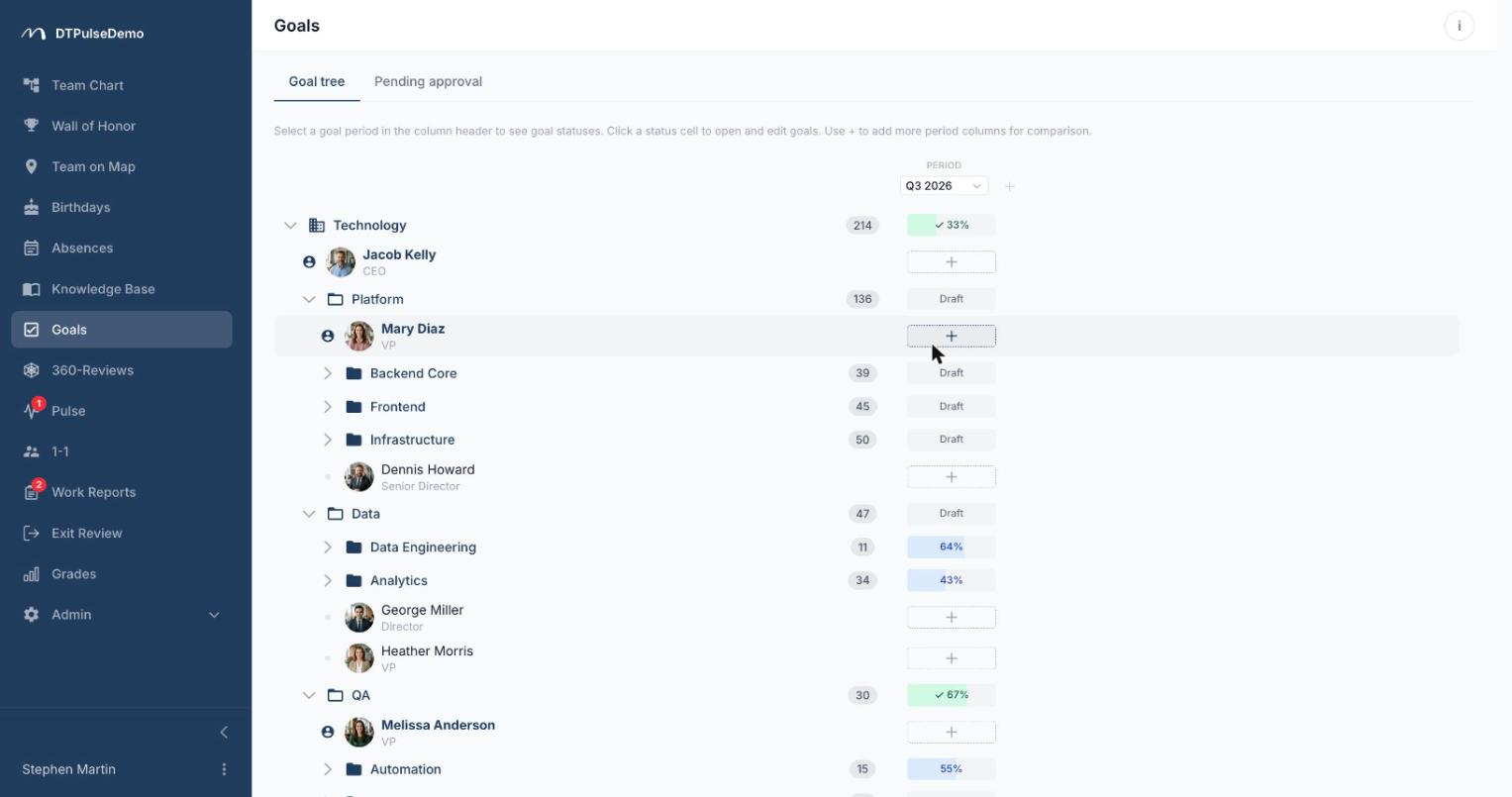
The goals screen is your org chart with period columns attached on the right. You can hold up to four periods side by side — this quarter next to last quarter next to the year — so the operational picture and the annual one are readable at the same time.
Where a row meets a column sits a goal block: a personal one for an employee, a shared one for a department. The cell shows status and completion percentage. Clicking it opens a panel where the whole block is edited without leaving the page.
Periods are created in the admin area: year, half-year, quarter, month, or an arbitrary date range with a name of your own.
Weights and criteria instead of self-assessment
Goals inside a block form a tree — a large goal splits into sub-goals to whatever depth you need. Each goal carries a weight from 0 to 100, which is simply a statement about what matters more.
A leaf goal — one that isn't split further — needs an achievement criterion, and there are two. Met / not met, for things that either happened or didn't: contract signed, release shipped. Target range, where you set the value that counts as zero, the value that counts as a hundred per cent, and the current value. Progress is interpolated linearly and clamped to 0–100, so overshooting doesn't inflate the total.
From there the arithmetic rolls upward on its own: a parent goal is the weighted average of its children, and the block is the weighted average of its top-level goals. Nobody types "70% done", and nobody argues with that number at the end of the period.
Three statuses and an approval step
A block moves through three states: draft, in progress, finished. Structure can only be edited in draft; actual values can only be updated while in progress. That isn't bureaucracy, it's protection — goals you can rewrite in the last week of the quarter aren't goals.
Moving a block forward is the approver's call: the owner's manager. When an owner clicks a status they can't set themselves, they send a status-change request with a note instead. Approvers get it by email and Slack, see it on a "Pending approval" tab, and carry a counter badge in the sidebar until they act. Rejection requires a reason, and that reason travels back to the owner with the notification.
Starting a block runs a check first: every goal needs a title and a non-zero weight, every leaf needs a criterion, and every numeric leaf needs its range. A block whose only entry is "improve processes" with no criterion simply won't start.
Who sees what
By default a goal block is visible to its owner and their approver; HR and admins see every block. A department's goals are additionally visible to people in that department and in departments nested under it.
While in draft, the owner can flip a block to public — then the whole company sees it in the shared tree. That's a deliberate switch rather than a default: some companies run open goals and some don't, and the product doesn't make that choice for you.
Whose time this saves
Employees know what they'll be assessed on and can see where they stand without waiting for a review meeting.
Managers get their whole team in one column, with percentages and statuses — including who hasn't started at all.
HR stops chasing goal-setting by email. Who hasn't submitted, who is waiting on approval and who is stuck in draft is readable straight off the tree.
Leadership gets four periods side by side, which is a trend rather than a single quarter.
How it connects to the rest of the portal
The goal tree is the same org structure that drives the team chart and grades — departments, heads and nesting come from there and update with it. Approvers are resolved by the same rules as absence approvals: direct manager, manually assigned managers, department heads. Notifications ride the same channels as every other approval, email and Slack.
That also means no separate goal-tracking subscription: goals, 360 reviews, grades and work reports all read the same list of people.
Getting started
Create a period — the current quarter will do. Open the goals section, pick that period in a column, click the cell for a person or a department, and write two or three goals with weights and criteria. Once the block is in progress, updating an actual value takes seconds and the percentage takes care of itself.
Goals are available on every plan, including the free tier for up to 10 people.