Once a quarter or twice a year there's a moment where somebody has to work out what a person actually did. Usually it takes the shape of an email asking everyone to "write up your achievements" — and back come ten documents of different lengths, different candour, and different definitions of the word achievement. Scoring them consistently is impossible; comparing them to each other, more so.
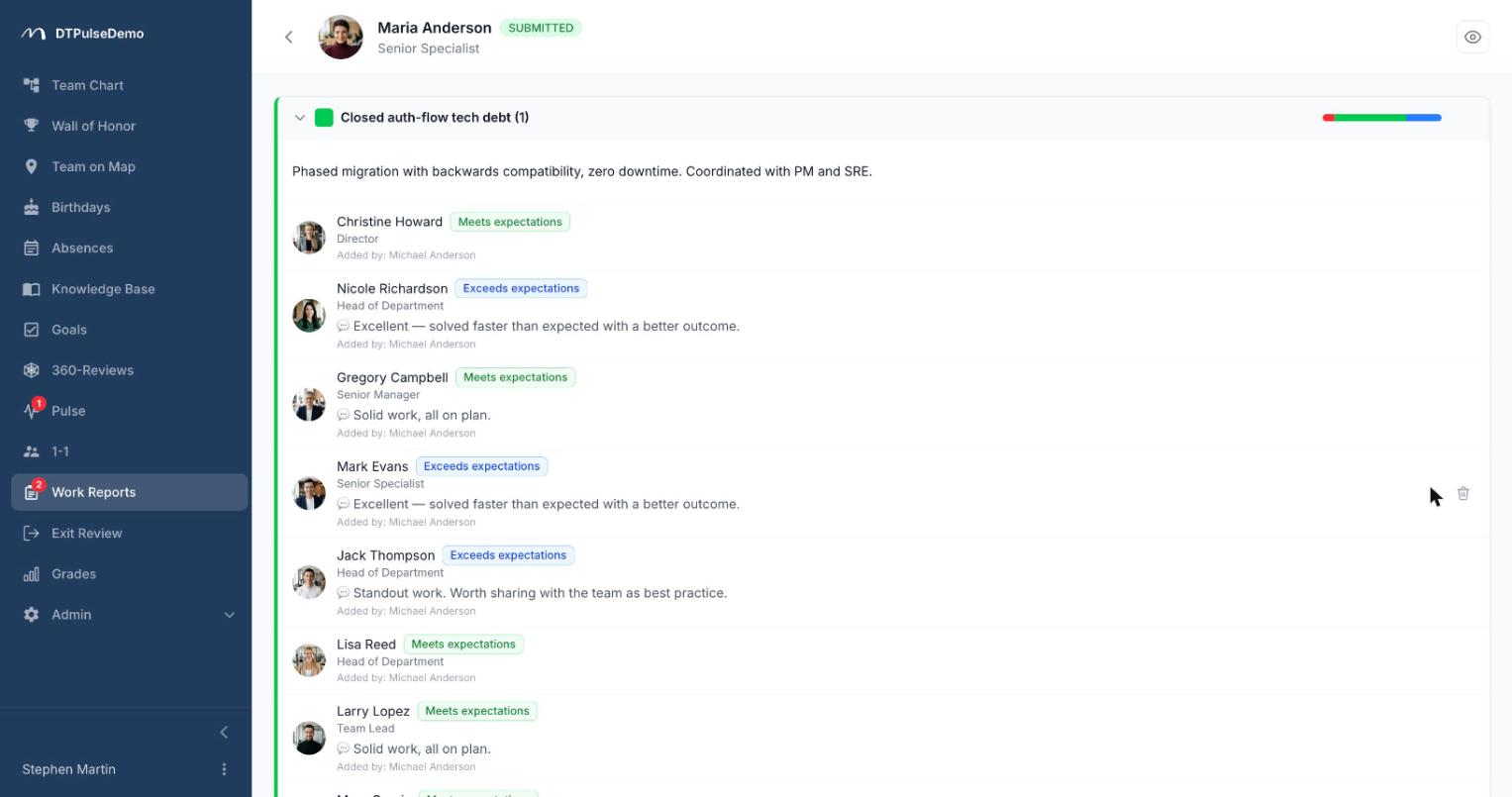
Work reports don't change the format so much as the structure of the conversation. The employee splits the period into individual outcomes and, for each one, names the people who can judge it with real context. Nobody rates the person as a whole — specific people rate specific outcomes they were close to.
How it works
HR creates a review: who has to write a report (by name, or by department — a department expands to everyone inside it), the deadline, and whether authors can see their own results. Start and close dates can be scheduled; the system opens the review and closes it on the deadline by itself.
The author adds blocks. One block, one outcome: a title and a markdown description. Reviewers are attached to each block individually. The report can't be submitted while any block is empty or has no reviewer — enforced in the browser and again on the server, so "I'll fill that in later" doesn't turn into a one-line report.
After submission the structure freezes: the author can no longer rewrite the framing after the fact. HR or a manager can still add a reviewer to a block later — someone who had already finished gets a fresh notification and their submission reopens, because otherwise the new ask would never reach them.
Scoring, outcome by outcome
A reviewer sees only the blocks they were assigned. Each one offers four buttons: Below expectations, Meets, Exceeds, and Cannot evaluate. The last is a legitimate opt-out on that specific outcome rather than on the whole report — if you weren't near that piece of work, saying so is more useful than defaulting to the middle.
A comment is mandatory for Below and Exceeds; the server refuses the submission without one. That rule exists for exactly one reason: an extreme score with no explanation helps neither the employee nor their manager. Meets and Cannot evaluate need no comment.
Comments autosave, the block card is tinted with the colour of the score picked, and the submit button in the page header stays disabled until every block has a score and every extreme score has a reason attached.
The headline number is a median
The summary score for a report is the median of the votes, not the mean. That's a deliberate choice. Averaging Below, Below, Exceeds produces Meets — a verdict none of the three reviewers actually held. The median is robust to one outlying opinion and doesn't smooth over a genuine split. The mean isn't discarded: it appears in the tooltip and drives sorting, so adjacent cases can still be told apart.
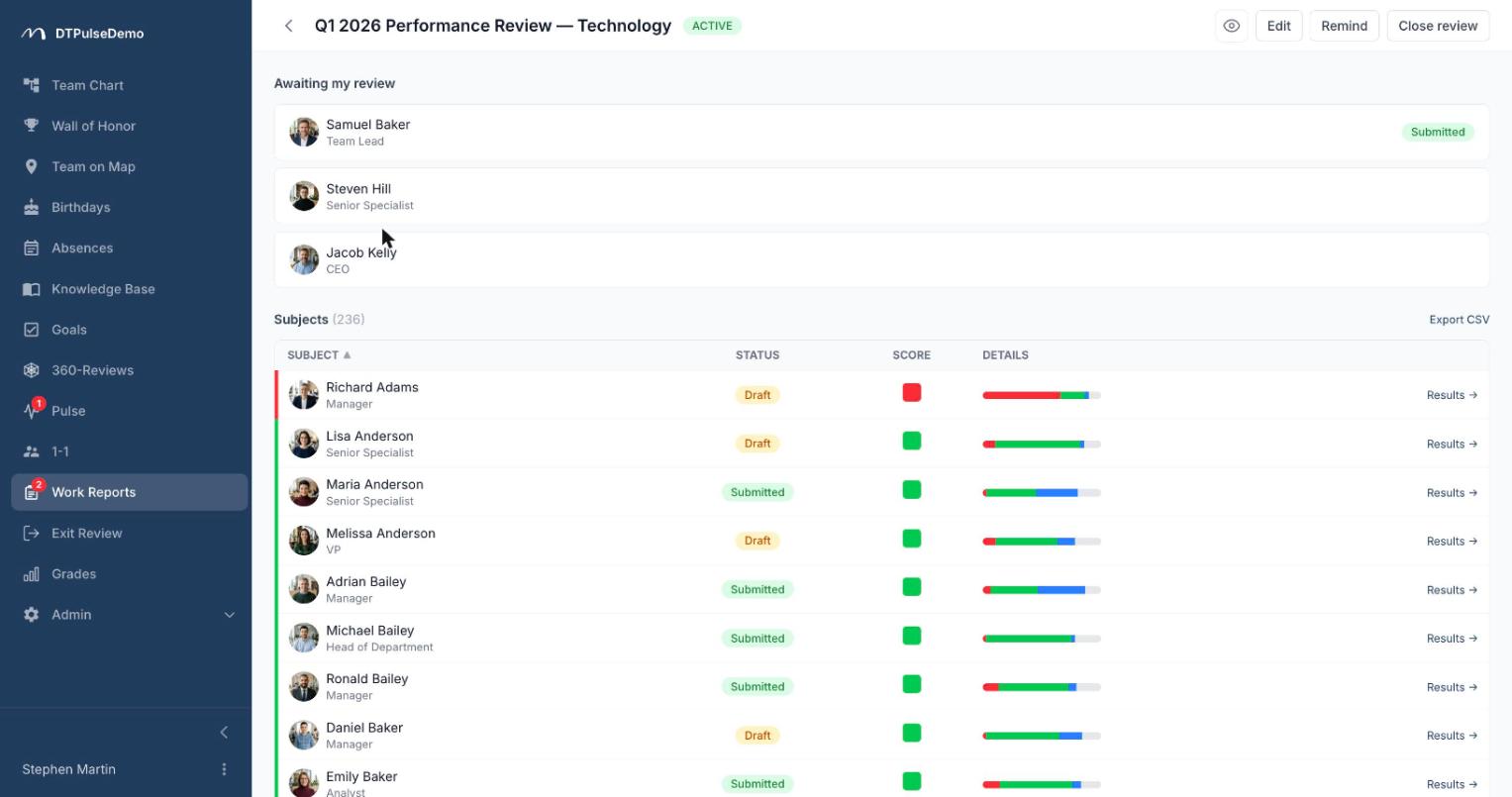
Next to every score sits a distribution bar showing how the votes landed. Without it, a Meets from a unanimous panel and a Meets from a divided one would look identical.
One dashboard, not a separate results page
Everything lives on the review's own page. HR and admins get two tables: their own direct reports on top, then every participant. A manager sees their people, with a direct-reports / all-levels toggle. An author sees their own card; a reviewer sees the list of what's waiting on them.
The table sorts by person, status and score, and each row opens the per-person view with block-level detail. A CSV export sits next to each section heading.
Who sees what
HR and admins see everything, drafts included. A manager sees full results for everyone in their team, including reports several levels down. The author sees their own results when HR has enabled that setting. A reviewer sees only their own blocks — and never the names of the other reviewers. That's a rule about the social graph, not about screen space.
Whose time this saves
Employees stop guessing at the format. There's a list of outcomes, and for each one it's clear who will speak to it.
Managers get feedback that isn't only their own. The conversation about results stops resting on a single vantage point.
HR sees the distribution across the company rather than just the final letters: where there's consensus, where there's a split, and who hasn't submitted.
Reviewers get two or three blocks they can genuinely speak to instead of a forty-item form about someone they barely worked with.
How it connects to the rest of the portal
Participants and manager permissions come from the org chart — the same one that routes absence approvals and populates 360 reviews. The sidebar entry carries a badge counting what's waiting on you personally: an unsubmitted report of your own plus any reviews assigned to you. The whole section can be switched off if your company doesn't work this way.
Getting started
Run one review on a single department with a two-week deadline. The first pass usually makes the point on its own: people write sharper outcomes when they know they're choosing the reviewers for them.
Work reports are available on every plan, including the free tier for up to 10 people.